
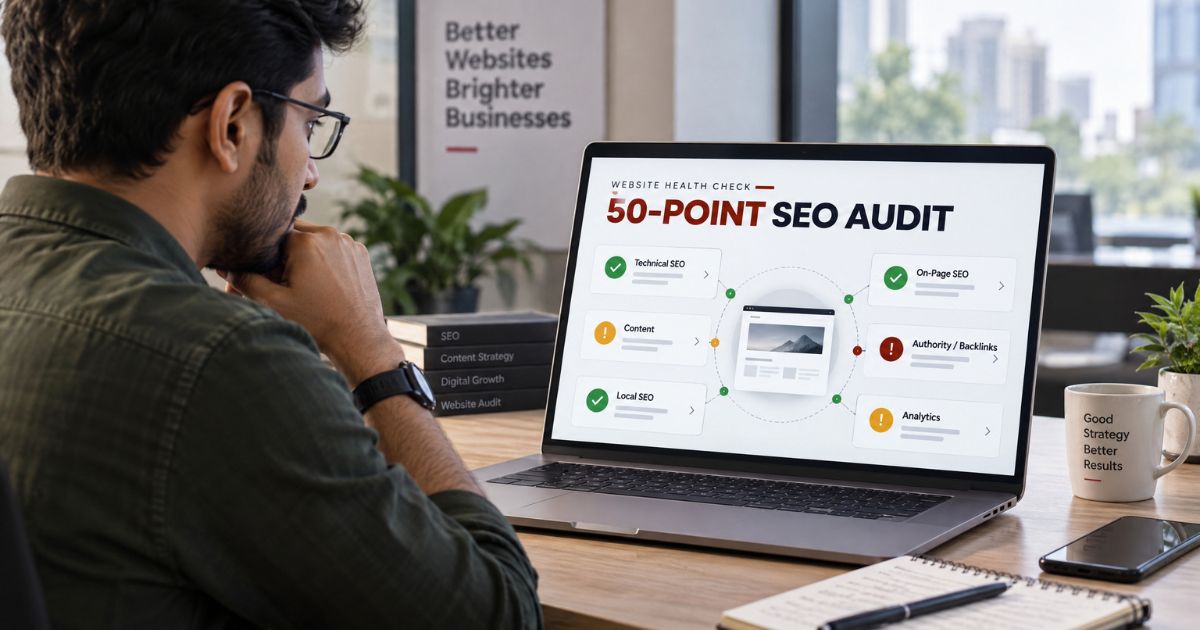
Your traffic dropped last month and you have no idea why. Leads are down. The site looks fine to you, but Google seems to have quietly moved on. Sound familiar? Before you spend money on ads or a new website, you need to know what’s actually broken.
That’s what this SEO audit checklist is for. Fifty clear checks you can run on your own site this week, with free tools, in plain English. No jargon. No guesswork.
What is an SEO audit? An SEO audit is a health check of your website. You review how well it’s set up for Google — technical, on-page, content, links, local, and tracking — then make a list of what to fix so the site ranks higher and brings in more customers.
We’ve grouped the 50 points into six simple sections. Work through them in order, tick each one off, and by the end you’ll know exactly where your site stands.
What an SEO Audit Is, and When to Do One
Think of it like a yearly health check-up, but for your website. You’re not fixing everything at once. You’re finding out what’s wrong so you can treat the right problems.
When should you run one? Do a full audit once or twice a year. Also do one after a website redesign, a platform change, or any sudden drop in traffic or leads. A quick monthly look at Search Console catches small issues before they grow.
Here’s an honest take: most owners skip the audit and jump straight to “we need more content” or “let’s run ads.” That’s like taking medicine before the diagnosis. Check first.
The Free Tools You’ll Need for This SEO Audit Checklist
You can run almost this entire audit for free. Set these up before you start :
- Google Search Console — your free window into how Google sees your site. Indexing, errors, search terms, links.
- Google Analytics 4 (GA4) — who visits, what they do, which pages bring leads.
- Google PageSpeed Insights — speed and Core Web Vitals, with a clear score.
- Bing Webmaster Tools — free, and has a handy built-in site scan.
- Screaming Frog (free up to 500 URLs) — crawls your site like Google does. Great for broken links and titles.
Paid tools like Ahrefs, Semrush, or Ubersuggest help with deeper backlink and keyword work. Nice to have, not needed to start. If this feels like a lot, [internal link: SEO services] is exactly the kind of setup we handle for clients.
Part 1: Technical SEO (Checks 1–12)
This is the foundation. If Google can’t crawl or read your site properly, nothing else matters.
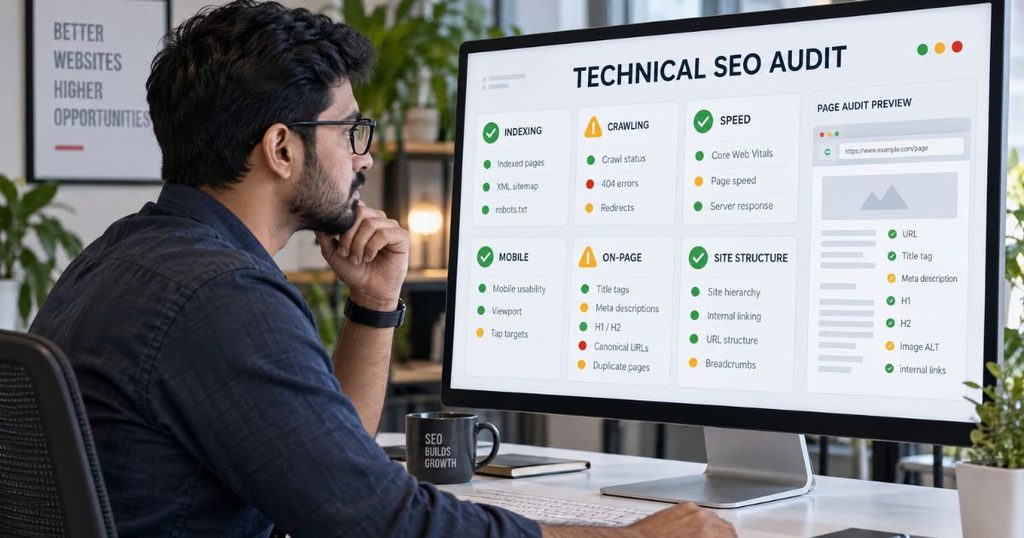
1. Is your site indexed — Search site:yourdomain.com on Google. Your main pages should appear. Better still, open Search Console › Pages. Good looks like: your important pages are “indexed,” not excluded.
2. XML sitemap submitted — Check Search Console › Sitemaps. Good: a sitemap.xml is submitted and shows “Success.” This helps Google find every page.
3. robots.txt isn’t blocking you — Visit yourdomain.com/robots.txt. Good: it doesn’t “Disallow” pages you want ranked. One wrong line here can hide your whole site — it happens more than you’d think.
4. HTTPS is on — Look for the padlock in the address bar. Good: the site loads on https, and the http version redirects to it. No “Not secure” warning.
5. Mobile-friendly — Open your site on a phone. Good: text is readable, buttons are tappable, nothing scrolls sideways. Most of your Indian visitors are on mobile, so this is non-negotiable.
6. Core Web Vitals & speed — Run your homepage and a product page through PageSpeed Insights. Good: LCP under 2.5 seconds and low CLS (layout shift). Aim for green on mobile.
7. No broken pages (404s) — Check Search Console › Pages, or crawl with Screaming Frog. Good: few or no broken links, and any important dead URL is redirected to a live page.
8. No long redirect chains — A page shouldn’t hop A → B → C before loading. Good: one clean 301 redirect. Chains waste crawl budget and slow things down.
9. Canonical tags are correct — View a page’s source and look for rel=”canonical”. Good: each page points to its own preferred URL, so Google doesn’t treat copies as separate pages.
10. No duplicate content — Copy a unique sentence from a page and search it in Google with quotes. Good: it shows up once, on your site. The same text on many URLs splits your ranking power.
11. Shallow site structure — Can you reach any key page in three clicks from the homepage? Good: clear menus, logical categories. Pages buried deep rarely get crawled or ranked.
12. No orphan pages — Orphan pages have no internal links pointing to them. Good: every important page is linked from somewhere. Screaming Frog flags these for you.
Part 2: On-Page SEO (Checks 13–24)
Now the pages themselves. This is where you tell Google what each page is about.
13. Unique title tags — Every page needs its own title, under about 60 characters, with the main keyword plus your brand. Good: no duplicates. Screaming Frog lists them all in one view.
14. Meta descriptions — Good: each page has one, 150–160 characters, with a reason to click. Missing? Google picks random text from the page — usually worse.
15. One clear H1 per page — Good: a single H1 that states the page topic. Several H1s split the focus and confuse the point of the page.
16. Logical heading order — Good: H2s and H3s nest sensibly, not jumping levels just for bigger text. It helps readers skim and Google understand structure.
17. Keyword in the right places — Your target keyword should sit in the title, the first 100 words, one H2, and the URL. Good: present and natural — never stuffed ten times.
18. Clean, readable URLs — Good: short URLs with real words, like /seo-services, not /page?id=93. Easier to read, share, and rank.
19. Image ALT text — Good: every meaningful image has a short, descriptive ALT. It helps blind users and gets you into Google Image search.
20. Image file sizes — Good: images are compressed and in a modern format like WebP. Heavy images are the number-one speed killer on Indian websites — check this one carefully.
21. Internal links — Good: each page links to two to five related pages using clear anchor text. This passes ranking strength around and keeps readers on-site.
22. No keyword cannibalisation — Two pages fighting for the same keyword? Good: one page per topic. Merge or re-target the weaker one so they stop competing with each other.
23. Content matches intent — Does the page give what the searcher wants? Good: a “how to” query gets clear steps, not a sales pitch. Mismatched intent won’t rank, however well written.
24. Readability — Good: short paragraphs, bullets, simple words — a 13-year-old could follow it. Walls of text send people straight back to Google.
Part 3: Content & E-E-A-T (Checks 25–32)
Google wants helpful content from sources it can trust. E-E-A-T stands for Experience, Expertise, Authoritativeness, and Trust.
25. Genuinely helpful content — Good: pages written for people, answering real questions, not thin filler churned out to fill space. Google’s helpful-content signals reward the real thing.
26. No thin pages — Pages with 50–100 words and no clear purpose drag you down. Good: improve them, merge them, or remove them.
27. Author information — Good: a real author name and short bio on articles — especially for health, finance, or legal topics. It’s the “experience” and “expertise” Google looks for.
28. Clear About & Contact — Good: a proper About page and a real address and phone number. Indian B2B buyers genuinely check these before enquiring, so don’t hide them.
29. Content freshness — Good: your key pages were updated in the last 12 months, with a visible “last updated” date. Old prices and stale stats quietly cost you trust.
30. Comparison & FAQ content — Good: pages that answer “vs,” “price,” “near me,” and the questions customers actually ask. These catch people who are ready to buy.
31. Keyword gaps — Topics competitors rank for that you don’t cover yet. Free way to find them: Google autocomplete, “People also ask,” and Keyword Planner.
32. Prune dead content — Good: old posts getting zero traffic are updated, merged, or redirected. A leaner, focused site often ranks better than a bloated one.
Part 4: Off-Page & Authority (Checks 33–38)
This is about trust from the rest of the web — mainly who links to you and talks about you.
33. Backlink profile — Who links to you? Open Search Console › Links (free). Good: links from real, relevant sites and respected Indian directories, not random spam.
34. Toxic links — Good: not many obviously spammy links. Don’t panic and disavow in bulk — Google ignores most junk on its own. Act only if you get a manual penalty.
35. Brand mentions — Search your brand name. Good: mentions on news sites, blogs, and directories. Even unlinked mentions help Google trust you’re a real business.
36. Competitor link gap — Where do rivals earn links you could too? Good: a short list of directories, local news, and partners worth approaching. Free Ubersuggest checks help here.
37. Local & niche directories — Good: you’re listed on Justdial, IndiaMART, Sulekha, and your industry portals — with the same name, address, and phone everywhere.
38. Linked social profiles — Good: active, linked LinkedIn and Instagram profiles that match your brand. It signals a living, legitimate business.
Part 5: Local & Google Business Profile (Checks 39–44)
If local customers matter to you, these six punch well above their weight.
39. Google Business Profile claimed — Good: verified, with the right primary category, correct hours, and real photos. It’s free and the single biggest lever for local visibility.
40. NAP consistency — Name, Address, Phone — written identically everywhere. Good: no “Shop No. 4” in one place and “Shop #4” in another. Mismatches confuse Google.
41. Reviews — Good: a steady flow of genuine reviews, and you reply to each one. Check both the rating and how recent they are.
42. Local keywords on site — Good: city and area terms in titles and content, like “chartered accountant in Kanpur,” plus a separate page for each city you serve.
43. Google Map embed — Good: your contact page embeds your actual Maps location. It builds local trust and makes it easy to find you.
44. Local schema — Good: LocalBusiness schema with your address and pin code. Check it with Google’s free Rich Results Test.
Part 6: Analytics & Tracking (Checks 45–50)
Last part. If you can’t measure it, you’re guessing. These make sure your numbers are real and useful.
45. GA4 installed everywhere — Good: Google Analytics 4 is firing on every page. Open the Realtime report and visit your own site to confirm you show up.
46. Search Console connected — Good: verified and collecting data. This is your free, direct line to what Google thinks of your site.
47. Conversion tracking — Good: form submits, phone taps, and WhatsApp clicks are tracked as events in GA4. Measure leads, not just visits.
48. Key events defined — Good: your important actions are set up as key events, so you can see what’s actually working and what isn’t.
49. Spam traffic filtered — Good: bot and referral spam is filtered out, so your traffic numbers reflect real people.
50. A simple monthly report — Good: a quick monthly check of traffic, rankings, and leads. What gets measured gets improved — keeping an eye on this beats any one-time fix.
Short on time? Media Sathi runs a free SEO audit for Indian businesses. We go through all 50 points for you and hand back a plain-English list of what to fix first. No cost, no jargon. Just visit mediasathi.com.
What to Fix First
Fifty checks can feel like a lot. Don’t try to do everything at once. Here’s a simple order that works.
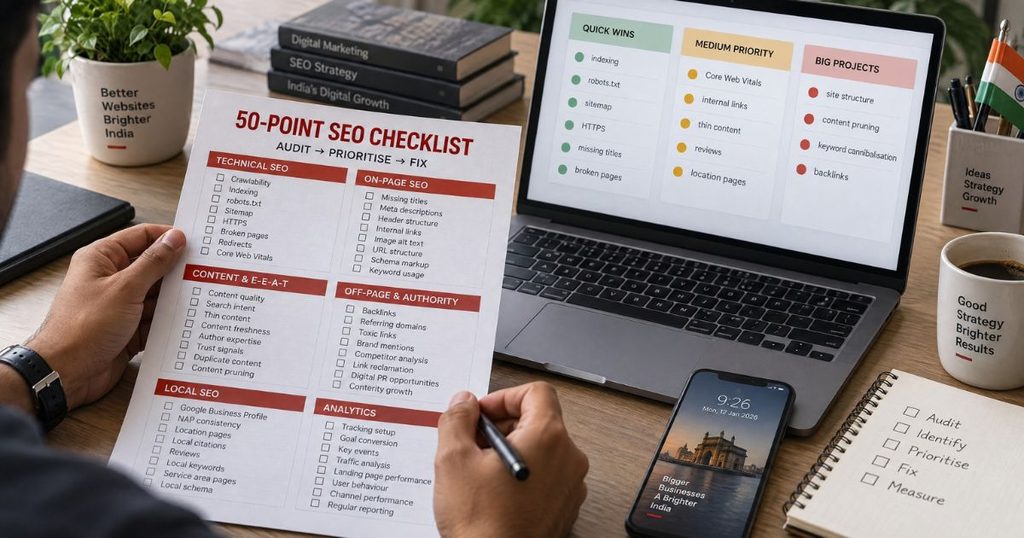
Quick wins — this week
- Fix indexing, robots.txt, and submit your sitemap.
- Sort out HTTPS and any “Not secure” warning.
- Add missing title tags and meta descriptions.
- Fix or redirect broken pages.
- Compress heavy images.
- Claim your Google Business Profile; install GA4 and Search Console.
Medium jobs — this month
- Improve Core Web Vitals and mobile speed.
- Add internal links and fix thin pages.
- Start collecting and replying to reviews.
- Build proper city/location pages.
Big jobs — this quarter
- Clean up site structure and keyword cannibalisation.
- Prune, merge, or rewrite weak content.
- Earn backlinks from real, relevant sites.
One rule to remember: fix what blocks Google first (technical and indexing), then chase links and content. A Pune SaaS firm we worked with had three pages fighting for one keyword — merging them into a single strong page moved it onto page one within a couple of months, with no new content at all.
Another quick story: a Noida clinic scored 28 on mobile speed because of huge uncompressed photos. After compressing them, the site loaded in half the time and enquiry calls picked up within weeks. Small fix, real result. This prioritising is a big part of what we do at Media Sathi — we tackle the cheap, high-impact fixes before the slow ones.
The One-Page Summary Checklist
Print this. Tick as you go.
Technical
- ☐ Site indexed (site: search / GSC)
- ☐ Sitemap submitted
- ☐ robots.txt not blocking
- ☐ HTTPS + redirect
- ☐ Mobile-friendly
- ☐ Core Web Vitals green
- ☐ No broken 404s
- ☐ No redirect chains
- ☐ Canonicals correct
- ☐ No duplicate content
- ☐ Shallow structure (3 clicks)
- ☐ No orphan pages
On-page
- ☐ Unique titles
- ☐ Meta descriptions
- ☐ One H1 per page
- ☐ Logical headings
- ☐ Keyword placed naturally
- ☐ Clean URLs
- ☐ Image ALT text
- ☐ Compressed images
- ☐ Internal links
- ☐ No cannibalisation
- ☐ Matches search intent
- ☐ Readable layout
Content & E-E-A-T
- ☐ Helpful, original content
- ☐ No thin pages
- ☐ Author info
- ☐ About & Contact
- ☐ Freshness / updated dates
- ☐ FAQ & comparison pages
- ☐ Keyword gaps covered
- ☐ Dead content pruned
Off-page
- ☐ Backlink profile reviewed
- ☐ Toxic links checked
- ☐ Brand mentions
- ☐ Competitor link gap
- ☐ Local/niche directories
- ☐ Linked social profiles
Local & GBP
- ☐ GBP claimed & verified
- ☐ NAP consistent
- ☐ Reviews + replies
- ☐ Local keywords/pages
- ☐ Map embed
- ☐ Local schema
Analytics
- ☐ GA4 installed
- ☐ Search Console connected
- ☐ Conversion tracking
- ☐ Key events set
- ☐ Spam filtered
- ☐ Monthly report
Ready for the easy route?
You can run every check above yourself — and you should at least once, because you’ll learn your own site. But if the list feels heavy or you’d rather spend the time running your business, that’s where we come in.
Two ways to start:
- Get a free SEO audit — we run all 50 points and send you a prioritised fix-list. Visit mediasathi.com.
- Talk to us — Contact Media Sathi, tell us your website and your goal, and we’ll point you to the three fixes that’ll move the needle fastest.
Open your Search Console right now and start with Check 1. Future-you will thank you.
FAQs :
Q1. What is an SEO audit?
An SEO audit is a health check of your website. You review how well it’s set up for Google — technical, on-page, content, links, local, and tracking — then list what to fix so the site ranks higher and brings more customers.
Q2. How often should I do an SEO audit?
Once or twice a year for most small businesses. Do a quick monthly check of Search Console for errors, and run a full audit after a redesign, a platform change, or a sudden traffic drop.
Q3. Can I do an SEO audit myself for free?
Yes. Search Console, GA4, PageSpeed Insights, and Bing Webmaster Tools are free and cover most of this checklist. Paid tools help, but you can run a solid audit without spending anything.
Q4. How long does an SEO audit take?
A basic 50-point audit takes a few hours for a small site. A large site can take a few days. Fixing what you find takes longer — and that’s where the results come from.
Q5. What should I fix first after an SEO audit?
Fix anything that stops Google seeing your pages: indexing, a blocking robots.txt, broken pages, and HTTPS. Then quick wins like missing titles and slow images, before big jobs like content and backlinks.


